

We rely on our laptops for almost everything, from closing high-stakes work deals to editing photos in remote locations. When the power dies, our productivity stops instantly. Portable power stations offer a solution to this frustration. These devices provide reliable electricity when you are off the grid or stuck during a blackout. They do more than just charge a laptop; they keep lights running, and charge your phones and cameras. With the right unit, you gain peace of mind knowing your work stays online no matter where you happen to be.
This guide helps you cut through the technical noise. We will look at how these portable power stations function, what specific features matter for laptops, and which models perform best for different needs. Whether you are a digital nomad or just prepping for storm season, you will find the right gear to stay powered up.
Portable Power Stations for Laptops
A portable power station is essentially a large, rugged battery pack with a brain. At its core, it stores electricity and converts it into a format your laptop can actually use. Most units include a lithium-ion battery, an inverter to change DC power to AC power, and a variety of ports. These ports allow you to plug in standard plugs, USB cables, and 12-volt car adapters.
When you plug your laptop into the portable power station, the internal inverter takes the stored DC energy from the battery and converts it into AC electricity. This allows your standard laptop power supply brick to function just as it would at home.
Not every power station is built for high-end electronics. When shopping for a portable power station, focus on these specific specs to avoid damaging your gear or running out of juice too soon.
Power Output (Wattage)
Laptops usually pull between 30 and 100 watts. You need a portable power station that can handle this continuous load. Always look at the “rated wattage” rather than the “peak wattage.” If your laptop pulls 65 watts, a 300-watt portable power station provides plenty of headroom to handle the load without overheating.
Battery Capacity (Wh)
This is measured in Watt-hours (Wh). A 500Wh battery can theoretically run a 50-watt device for 10 hours. Higher capacity means more runtime, but it also increases weight and price.
Portability and Weight
A portable power station with 2000Wh or 3000Wh of capacity is good for using back at home, but it is heavy. If you plan to carry your gear, stick to units that are lighter to carry.
Charging Methods
How do you refill the battery? Look for units that accept solar panel inputs, wall outlets, and car 12V ports. Fast charging speeds save you time when you are on the move.
Pure Sine Wave Inverters
This is the most critical feature. Cheap inverters create “modified sine waves,” which can overheat or damage the delicate power supply in your laptop. Always ensure the unit uses a pure sine wave inverter to keep your laptop safe.
Types of Portable Power Generators for Laptops
Choosing the right type of generator depends on where and how you plan to use it.
Gas-Powered Portable Generators
Traditional generators burn gasoline to spin a motor and create electricity. These are powerhouse units that can run for days as long as you have fuel.
- Pros: Large power output and quick refueling.
- Cons: They are loud, produce exhaust fumes, and generally require maintenance like oil changes.
Usually, gas-powered portable generators are rarely the right choice for powering a single laptop in a quiet area.
Portable Power Stations
These are the most common choice for laptop users. They use lithium batteries and can be recharged using portable solar panels. They are quiet, emit no fumes, and require no maintenance.
- Pros: Silent operation, eco-friendly, and great for camping or quiet workspaces.
- Cons: Recharging takes time, and you are limited by how much sun you can catch.
If you are camping for a weekend, a solar-powered portable power station can keep your laptop running during the day while you work, then recharge via solar panels while you explore the site.
How to Choose the Right Portable Power Station
Before you buy, you need to crunch a few numbers. You don’t want to overspend on power you don’t need, nor do you want to be left without a charge.
Assess Your Laptop’s Power Needs
Look at the brick on your laptop’s charging cable. You will see an output section that lists volts (V) and amps (A). Multiply these two numbers together to find the wattage (W). For example, if your charger says 20V and 3.25A, you have a 65-watt laptop. This is the minimum wattage your generator must be able to support.
Calculate Required Runtime
To figure out how much battery capacity you need, use this simple formula:
(Laptop Wattage × Hours Needed) × 1.3 = Required Watt-hours (Wh)
The 1.3 multiplier accounts for energy loss during the conversion process inside the generator. If you need 5 hours of work on a 60-watt laptop, you need: (60W × 5h) × 1.3 = 390Wh.
In this case, look for a portable power station with at least 400Wh of capacity to ensure you don’t run dry.
Top Portable Power Stations for Laptops
Finding the right unit means balancing your need for power against your need for mobility. Here are a few options that hit the mark for laptop computer users.
Best Overall: Jackery Explorer 1000 V2
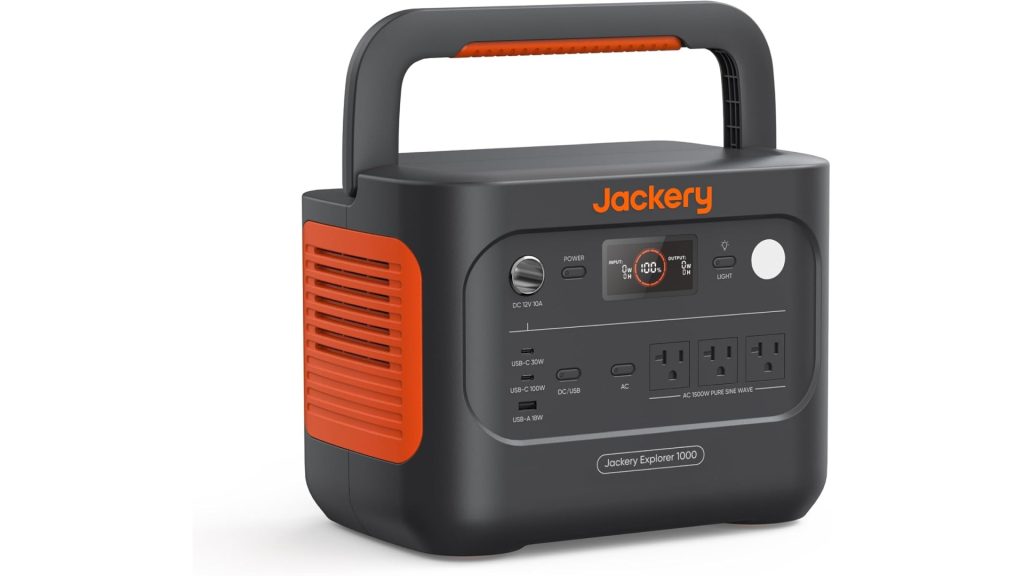
The Jackery Explorer 1000 V2 is a great portable battery for camping trips and powering laptop computers. It weighs under 24 lbs and has a 1500W output to run many tools. Charging is fast, often taking less than two hours.
It features several USB and AC ports to power all your gear at once. The LFP battery lasts over ten years, making it a smart buy. A handy app lets you control settings from your phone.
Users love that it is quiet and tough. It works well with solar panels for green energy. This power station is a reliable, easy-to-use choice for any adventure. Get your own Jackery Explorer 1000 V2 on Amazon (paid link).
EcoFlow Delta 3
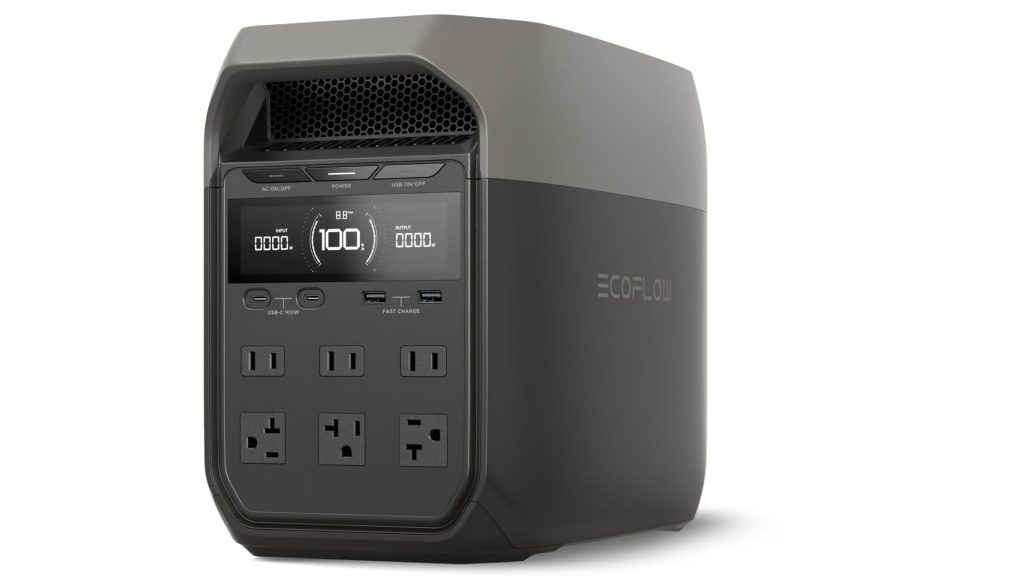
The EcoFlow Delta 3 is a handy power station for camping or emergencies. It has a 1024Wh capacity and 13 ports to charge all your gadgets. You can fill the battery in just one hour using a wall plug. It also works with solar panels. If you need more juice, you can add extra battery packs. The build is tough, dust-proof, and lasts for years.
Users love how quiet it is and how easy it is to carry, making it a smart buy for any trip or laptop computer. Click here to check price on Amazon (paid link).
Anker Solix C1000

The Anker SOLIX C1000 is another good pick for camping or emergencies. It has a 1056Wh battery that lasts for up to ten years. You can power most small tools with its 1800W peak output.
Charging is fast: it hits full power in one hour using a wall plug. If you use solar panels, it takes under two hours in bright sun. With 11 different ports, you can plug in almost any device, including laptop computers. You can even track your power use with the Anker app.
It comes with cables for your car and wall, but you must buy solar panels separately. Nonetheless, it will be able to power your laptop computer without a problem. Click here to view the Anker Solix C1000 on Amazon (paid link).
Final Thoughts
The right portable power station keeps your laptop running when you need it most. By focusing on capacity, pure sine wave output, and the right charging methods, you can ensure your workflow never suffers from a dead battery.
Start by checking your laptop’s specific power requirements. From there, match your runtime needs to a capacity that fits your budget. Whether you choose a compact model for travel or a high-capacity unit for heavy-duty work, investing in reliable power gives you the freedom to work from anywhere. Take these steps today, and you will never have to worry about a dying laptop battery again.
Photo by Ales Nesetril on Unsplash.